As the factory grows its time to take a step back and look at the whole thing. Nomad 0.7.0 adds a tactical view, powered by ASCII, first blueprint mechanics, and a complete overhaul of our early game 3D assets.
What’s new
Tactical view
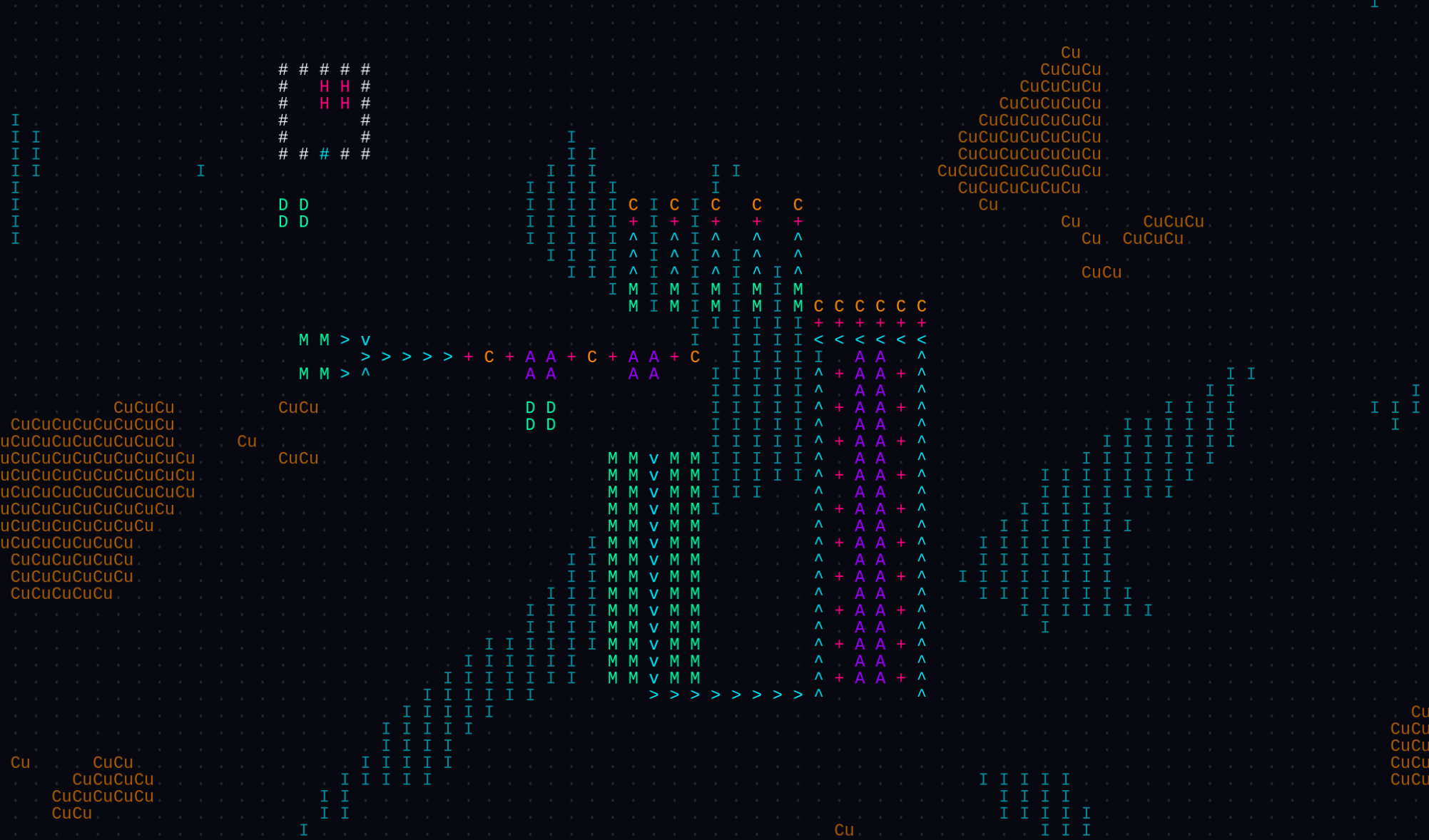
Zooming the camera out switches the display into a tactical ASCII map. The tactical map replaces detailed meshes with ASCII glyphs.
- Arrows show belt direction
- Plus signs mark inserters
- Letters identify machines (I for Iron, CU for Copper, …) ⇒ Now that I think about it, we could use the periodic table symbols for all the ores, not just Copper 🤷♂️
We drop individual items from transport lines, improving performance at this scale. Here a quick first look at the feature in action:
Why and how it was built:
The simulation in Nomad runs on a data-oriented loop with flat struct arrays in C#, completely detached from Godot’s scene tree. Because the simulation has no rendering dependencies, we could swap out the visuals without altering any game logic.
The RenderManager simply gets replaced by the TacticalRenderManager. They both share a newly introduced IRenderPipeline interface. This is architecturally clean and makes it possible in the future to write any kind of Render interface. I like that the architectural decision to decouple the Simulation from the Rendering part already pays off by making this possible.
Blueprint stamping and the blueprint book
You can now copy, save, and stamp blueprint. Pressing C in build mode brings up an area selection tool Dragging across any part of your base captures both finished structures and planned ghosts, trims empty borders, and puts the layout directly onto the cursor.
While holding a blueprint, pressing R rotates the entire layout 90 degrees clockwise. Left click places the ghosts if the spot is clear, or hold Shift to place everything that fits and skip blocked tiles. Captured blueprints preserve machine recipes and inserter filter settings. Pressing Ctrl+S saves the held pattern to your blueprint book (K), where you can review dimensions, check ingredient costs, and stamp saved designs.
Reworking the legacy Nordustry assets
We replaced our original placeholder art from the prototype phase with custom low-poly models built in Blender. The new models give the miner, chest, assembler, and logistics items clean silhouettes with neon emissives that match the Synthwave 80s theme.
Along with the visual cleanup, we restructured the early crafting tree. We removed iron screws, which added busywork without interesting logistics choices. We also added copper smelting and stamping lines for copper ingots and copper plates. Builder drones now require proper metal plates instead of raw copper ore, giving copper an authentic production chain from the first hour.
Why and how it was built:
The prototype assets were high-polygon models bundled with multi-megabyte JPEG textures. Rendering thousands of them in MultiMesh batches was putting unnecessary pressure on memory and frame times. Also since those assets were from the former Nordustry project, they did not fit the Synthwave style we are going for now.
To keep future resource additions simple, we built base templates for ores, ingots, and plates in Blender. Adding new materials like coal or titanium requires only a new palette material applied to the shared base geometry. Each asset file also contains an orthographic camera and studio lighting rig, letting us export transparent 1024x1024 UI icons with consistent angles and lighting.
What’s next
For version 0.8.0, I am experimenting with a major change: moving from flat ground onto finite, spherical planets. I just really like the idea of playing on a closed world where you can build all the way around until you meet your own supply lines on the other side.
Getting a factory grid onto a sphere is a little bit tricky. A very early prototype of Nomad used a hexagonal grid, but Euler’s polyhedron formula proves that tiling a sphere with hexagons requires twelve pentagons to close the mesh. Those twelve uneven spots break grid regularity, which makes large-scale building and blueprint stamping too limited as every blueprint would have to be anchored on a pentagon if the original blueprint involves one.
But also square grids have their problems on a sphere. You either get severe pinch distortion at the poles, or you have to slice the planet into latitude bands with different grid resolutions like Dyson Sphere Program does.
The current prototype keeps a uniform square grid across the buildable surface and caps the poles as non-build zones. This avoids the grid distortion for the most part. It also means that we have a entry point for enemies at the pole caps of the planets.