Ever since my first web development course in university, I’ve been tinkering with projects, mostly using the MEAN stack. Since I’m also a game developer, I eventually tried to combine both. The result is Odyssey: a web app that’s part Multi-User Dungeon (MUD), part simulator, and part RPG. It’s a long-term project that I keep adding to in my free time.
Combining WebDev and Gaming
Odyssey isn’t a standard website. It’s a text-heavy, fantastical world where you can create multiple characters and explore a procedurally generated landscape. I wanted to see if I could take the depth of a classic MUD and bring it into a modern web environment.
Building the World
The map is probably the most important part of the project. Instead of a fixed world, I used a Simplex Noise algorithm to generate heightmaps. It assigns a value between 0.0 and 1.0 to every coordinate, which determines things like the biome and where cities are placed. This makes the world feel much more dynamic than a traditional static RPG map. I later even built a standalone Fantasy World Map Generator to visualize these kinds of worlds.
The Tech Stack
Odyssey is split into two separate projects: a backend that handles the logic and a frontend to display everything.
Odyssey Frontend
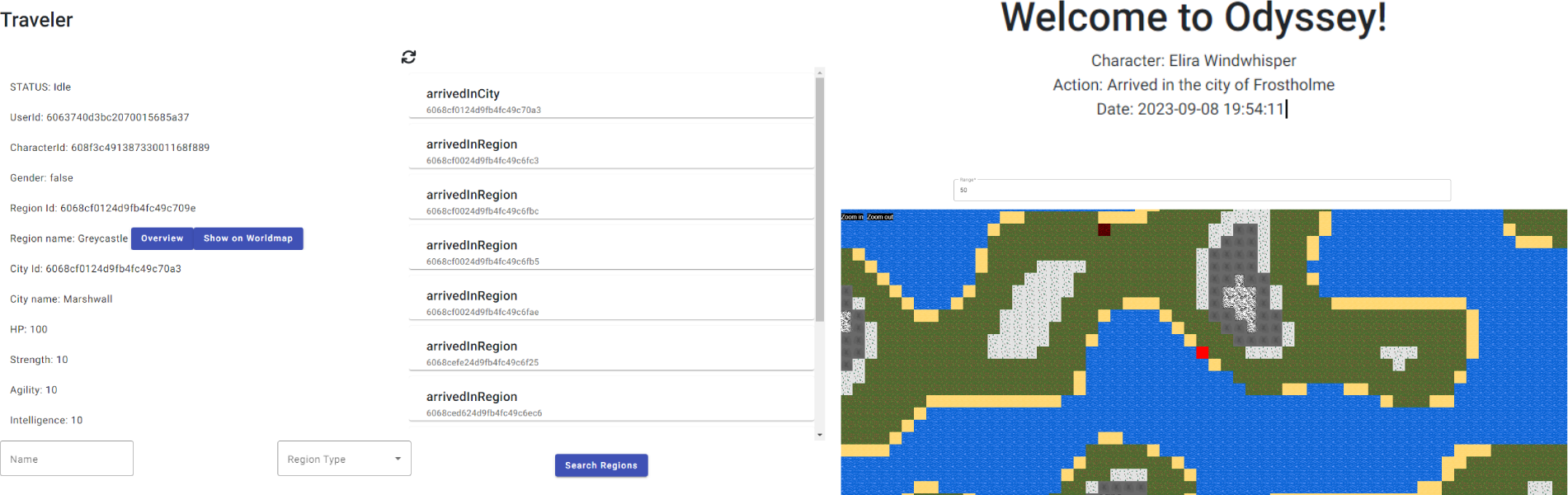
The frontend uses Angular for the main UI and Phaser.js for the world map. Angular handles the data and state, while Phaser takes care of rendering the map and making it interactive.
Odyssey Backend
The backend is built with Express.js. It acts as a REST API, serving up data for regions, cities, and characters. It also handles the boring but necessary stuff like user authentication and secure sessions.
Generating Regions
The world generates coordinates in a spiral pattern starting from (0,0). I actually ended up with two functions for this: spiralOut and spiralOutPerformance.
- spiralOut: This is the basic version. It works fine for small maps, but because it recalculates from (0,0) every time, it gets slow as the world grows.
- spiralOutPerformance: I wrote this to fix the scaling issue. It remembers the last coordinate and direction, so it can just calculate the next step instantly without starting over.
export let x: number = 0;
export let y: number = 0;
export let delta: number[] | null = null;

export function setDeltaNull(): void {
  delta = null;
}

export function spiralOut(iterations: number): number[] {
  x = 0;
  y = 0;
  delta = [0, -1];

  for (let i: number = 0; i <= iterations; i++) {
    if (
      x === y ||
      (x < 0 && x === -y) ||
      (x > 0 && x === 1 - y)
    ) {
      // change direction
      delta = [-delta[1], delta[0]];
    }

    x += delta[0];
    y += delta[1];
  }
  x -= delta[0];
  y -= delta[1];

  return [x, y];
}

export function spiralOutPerformance(): number[] {
  if(delta) {
    x += delta[0]
    y += delta[1]
  }

  if (
    x === y ||
    (x < 0 && x === -y) ||
    (x > 0 && x === 1 - y)
  ) {
    // change direction
    if(delta) delta = [-delta[1], delta[0]];
  }

  return [x, y];
}
Once a coordinate is generated, the Simplex Noise algorithm gives it a height value. That value then determines everything from the biome type to whether a city should spawn there.
Pathfinding
For character movement, I used the A* algorithm via the PathFinding.js library. It calculates the most efficient route between two regions while avoiding water.
import { RegionModel, Region } from '../components/regions/regionModel';
import PF from 'pathfinding';

export default function findPath(startRegion: Region, endRegion: Region, clearance: number): Promise<Region[] | void> {
  const promise = new Promise<Region[]>((resolve, reject) => {
    // Calculate Grid Borders
    const topLeftX = startRegion.x < endRegion.x ? startRegion.x : endRegion.x;
    const topLeftY = startRegion.y > endRegion.y ? startRegion.y : endRegion.y;

    const bottomRightX = startRegion.x > endRegion.x ? startRegion.x : endRegion.x;
    const bottomRightY = startRegion.y < endRegion.y ? startRegion.y : endRegion.y;

    // Fetch Regions
    RegionModel.find({
      x: { $gte: topLeftX - clearance, $lte: bottomRightX + clearance },
      y: { $gte: bottomRightY - clearance, $lte: topLeftY + clearance }
    }, 'x y type', { sort: { y: 1, x: 1 } })
      .then(regions => {
        // Generate Search Matrix
        const griddMatrix: Region[][] = [];
        let pointerYWorld = regions[0].y;
        let row: Region[] = [];
        regions.forEach(region => {
          if (pointerYWorld !== region.y) {
            griddMatrix.push(row);
            row = [];
          }
          row.push(region);
          pointerYWorld = region.y;
        });
        griddMatrix.push(row);

        // Find our Start and Endpoint in the gridmatrix
        const startRegionY = griddMatrix.findIndex(s => s.some(o => o._id.toString() === startRegion._id.toString()));
        const startRegionX = griddMatrix[startRegionY].findIndex(s => s._id.toString() === startRegion._id.toString());
        const endRegionY = griddMatrix.findIndex(s => s.some(o => o._id.toString() === endRegion._id.toString()));
        const endRegionX = griddMatrix[endRegionY].findIndex(s => s._id.toString() === endRegion._id.toString());

        // Generate a binary matrix to define walkable tiles
        const binaryMatrix = griddMatrix.map(x => x.map(r => r.type !== 'water' ? 0 : 1));

        // A* Path Searching
        const grid = new PF.Grid(binaryMatrix);
        const finder = new PF.AStarFinder();
        const path = finder.findPath(
          startRegionX,
          startRegionY,
          endRegionX,
          endRegionY,
          grid
        );

        // This is the way
        const stations: Region[] = [];
        path.forEach(coordinate => {
          stations.push(griddMatrix[coordinate[1]][coordinate[0]]);
        });
        return resolve(stations);
        });
      })
      .catch(err => {
        console.log(err)
      })

  return promise;
}
Check it out
Odyssey is still very much a work in progress, but the core systems are there. If you want to see it in action, you can try it out here.